
What can an AI agent actually do in Dynamics 365 F&O (V49)?
An AI agent can do almost anything a user can do in Dynamics 365 F&O. At least, that’s what we keep hearing.
Technically, that’s not far off. But it doesn’t tell us much about the cost or reliability of getting the work done.
So I went through the standard X++ code in 10.0.49 to see what Microsoft actually provides. I found 50 business actions, most of them built for Microsoft’s own agents.
That raised a more interesting question for me: what should an agent do itself, and what should we leave to F&O?
One agent, three ways in
An agent does not log in the way a person does. It talks to Dynamics through the Dynamics 365 ERP MCP server, a standard connection that agent platforms such as Copilot Studio understand. That server gives the agent three kinds of tools:
- Pages. The agent opens a page, fills in fields and clicks buttons, like a user with the same security roles. Almost everything in the application is reachable this way.
- Data. The agent reads and writes records directly, through the same data entities your integrations use. Quicker than pages. Entities can run X++ validation and business logic too, but the agent works on records (create, read, update, delete), not on an explicit business operation with its own contract.
- Actions. The agent calls a piece of business logic that a developer made available as one step. One call, and the routine runs.
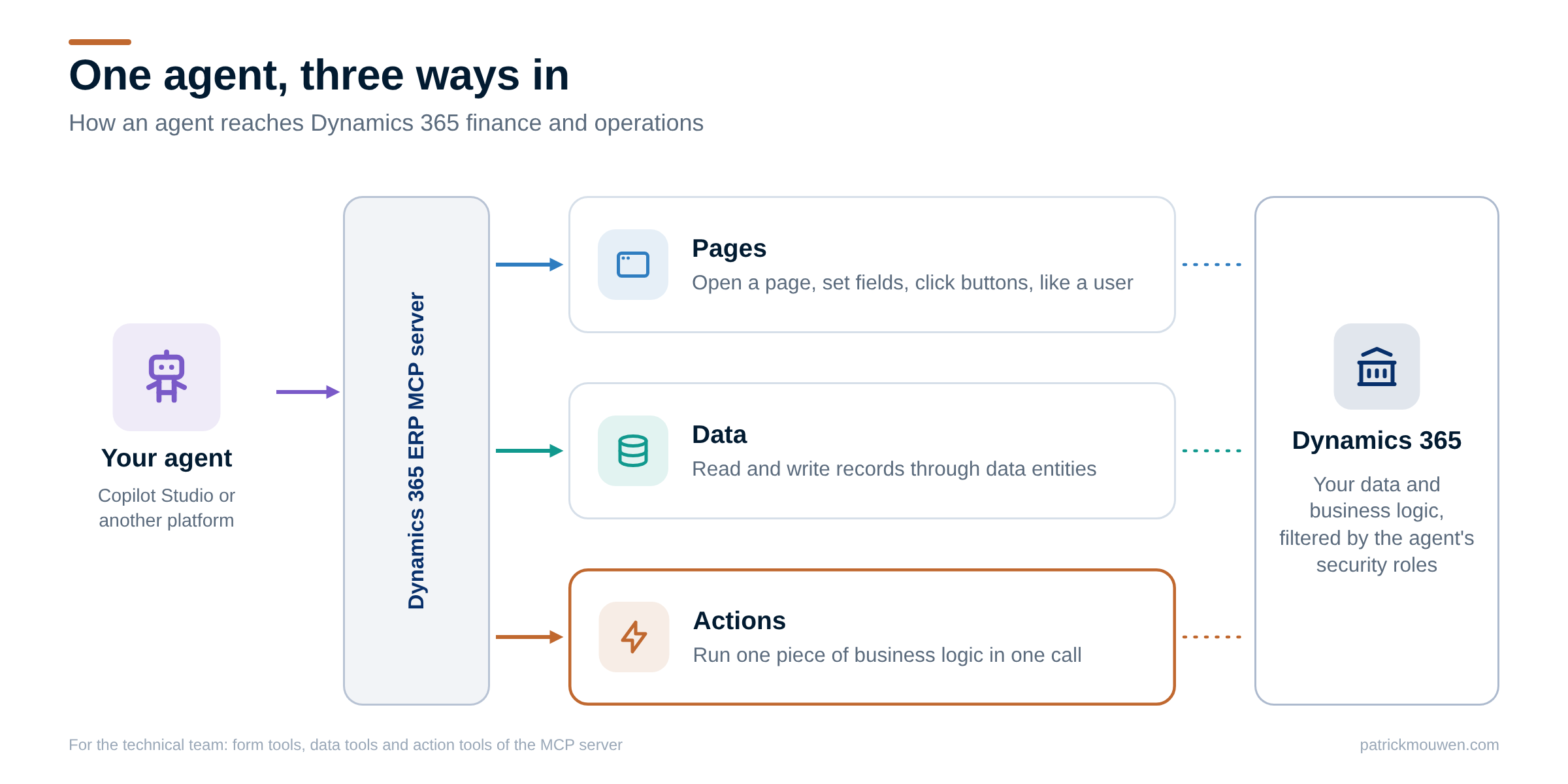
So the real question is not whether an agent can reach your process. It is: which way in does your task need?
Clicking through pages, or calling one action?
Pages are the tempting road. No development, and the agent can do almost anything a user can. For a one-off question or an occasional task, that is exactly right.
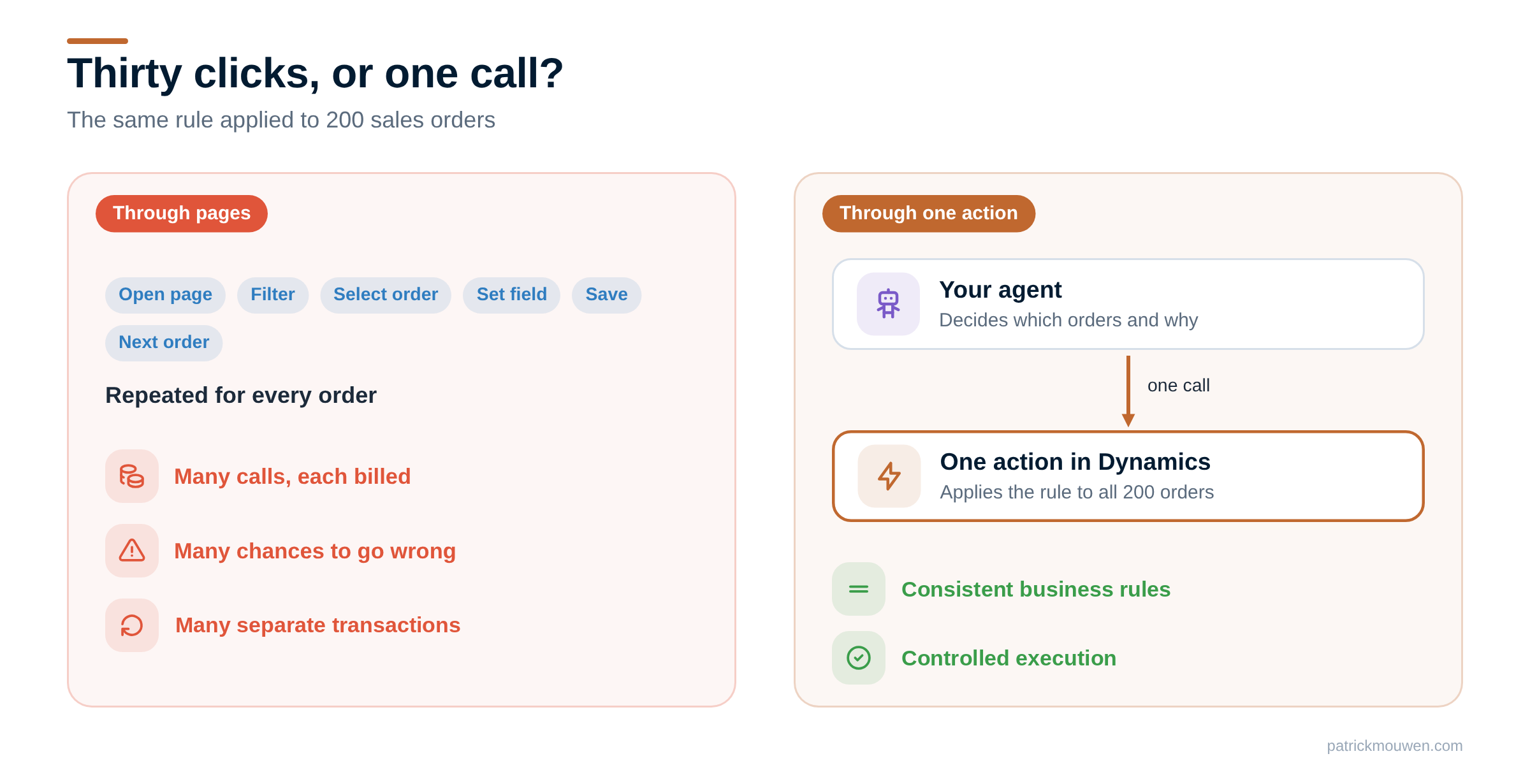
For work that repeats, the page road gets expensive:
- Every step costs calls. Opening a page, setting fields, clicking a button: every interaction with F&O requires tool calls, and multi-step workflows can quickly accumulate them. Depending on your licences, each call is billed.
- Every step can go wrong. The agent decides each click again, every time. Over hundreds of orders, small error rates add up.
- No single undo. A workflow through pages often runs over several transactions. If it stops halfway, you need extra recovery and error handling.
The better road for repeatable, rule-based work is an action. The rule lives in code and is tested once. The agent calls it in one step: apply this rule to these 200 orders. The agent decides what and when. The routine does the how: consistent business rules and controlled execution.
What Microsoft ships today: 50 actions
I counted the actions in the standard code of release 10.0.49. There are 50, and most of them were built for Microsoft’s own agents.
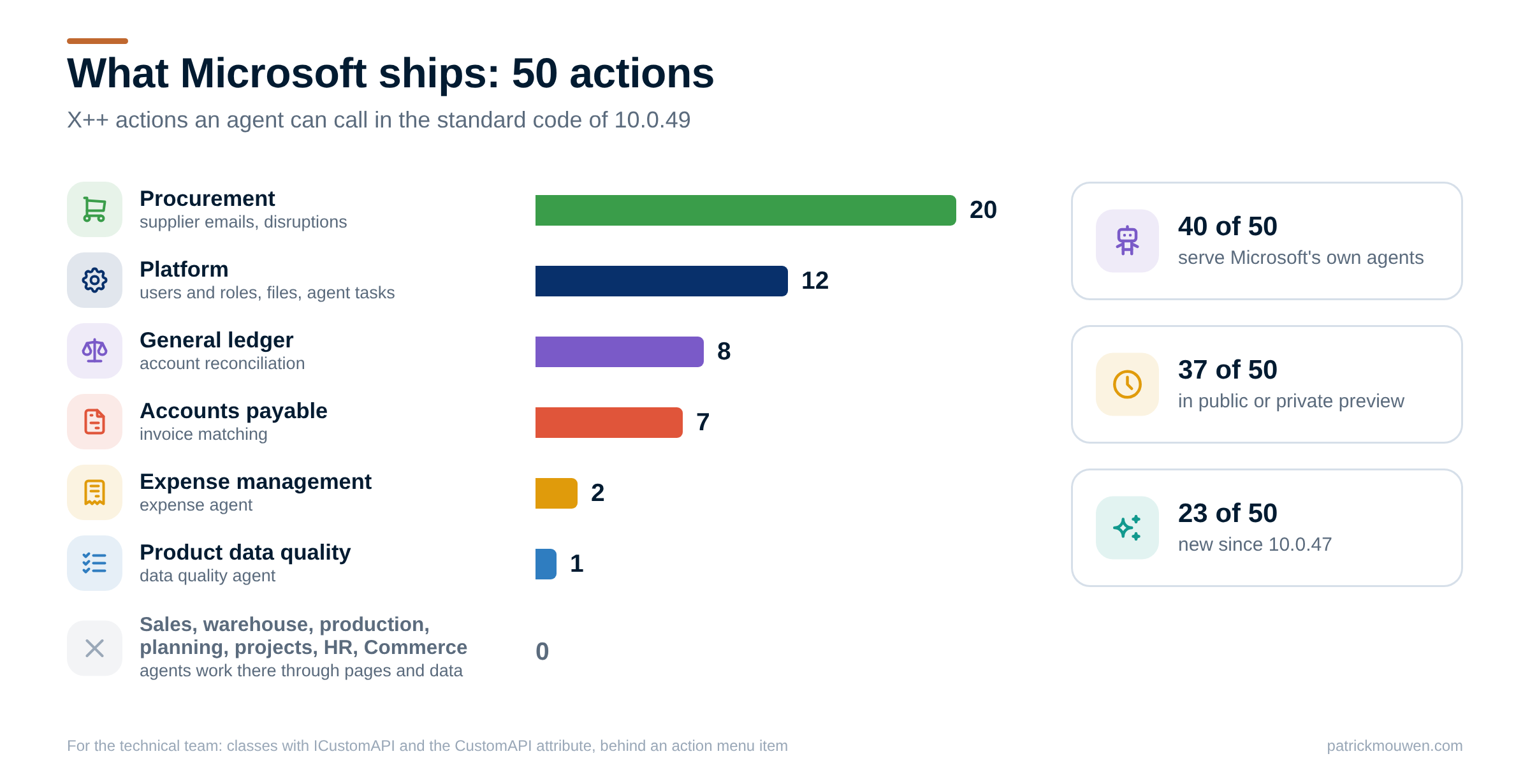
- Procurement: 20. Mostly for the supplier communications agent, which reads vendor emails and proposes purchase order updates, and for the disruption agent, which works out which orders a late delivery hits.
- Platform: 12. A health check, finding users and their security roles, a token to attach files, and the agent framework itself.
- General ledger: 8, all for the account reconciliation agent.
- Accounts payable: 7, for matching vendor invoices to product receipts.
- Expense management: 2, for the expense agent.
- Product data quality: 1, for a data quality agent.
Sales, warehouse, production, planning, projects, HR and Commerce have zero standard X++ actions in this build. That is not zero possibilities for agents: they can still work there through pages and data, or through actions you build yourself.
Status matters too. 34 of the 50 belong to features in public preview. 3 belong to private preview, which Microsoft has not committed to release. 23 arrived in the last three releases.
For the technical team: an action is an X++ class that implements ICustomAPI, carries the CustomAPI attribute and sits behind an action menu item that a security role grants. Agents find and run them with api_find_actions and api_invoke_action. See Use Model Context Protocol for finance and operations apps and Create AI tools with finance and operations business logic, itself still in preview.
And the cost? In Copilot Studio, each tool call is billed as an agent action. That usage is included in the Microsoft 365 Copilot licence when a licensed employee uses the agent under their own identity. Other agent platforms pay 0.1 Copilot Credits per tool call on top of their own model costs, unless users hold a premium Finance or Supply Chain Management licence. The full rules are in the licensing section on Microsoft Learn; check with your Microsoft partner what applies to you.
Your task decides the way in
Which way in fits depends less on the agent and more on the task. Picture a line. On one end sits judgement on messy input: an email, a PDF, a vague request. On the other end sits a fixed rule applied to many records.
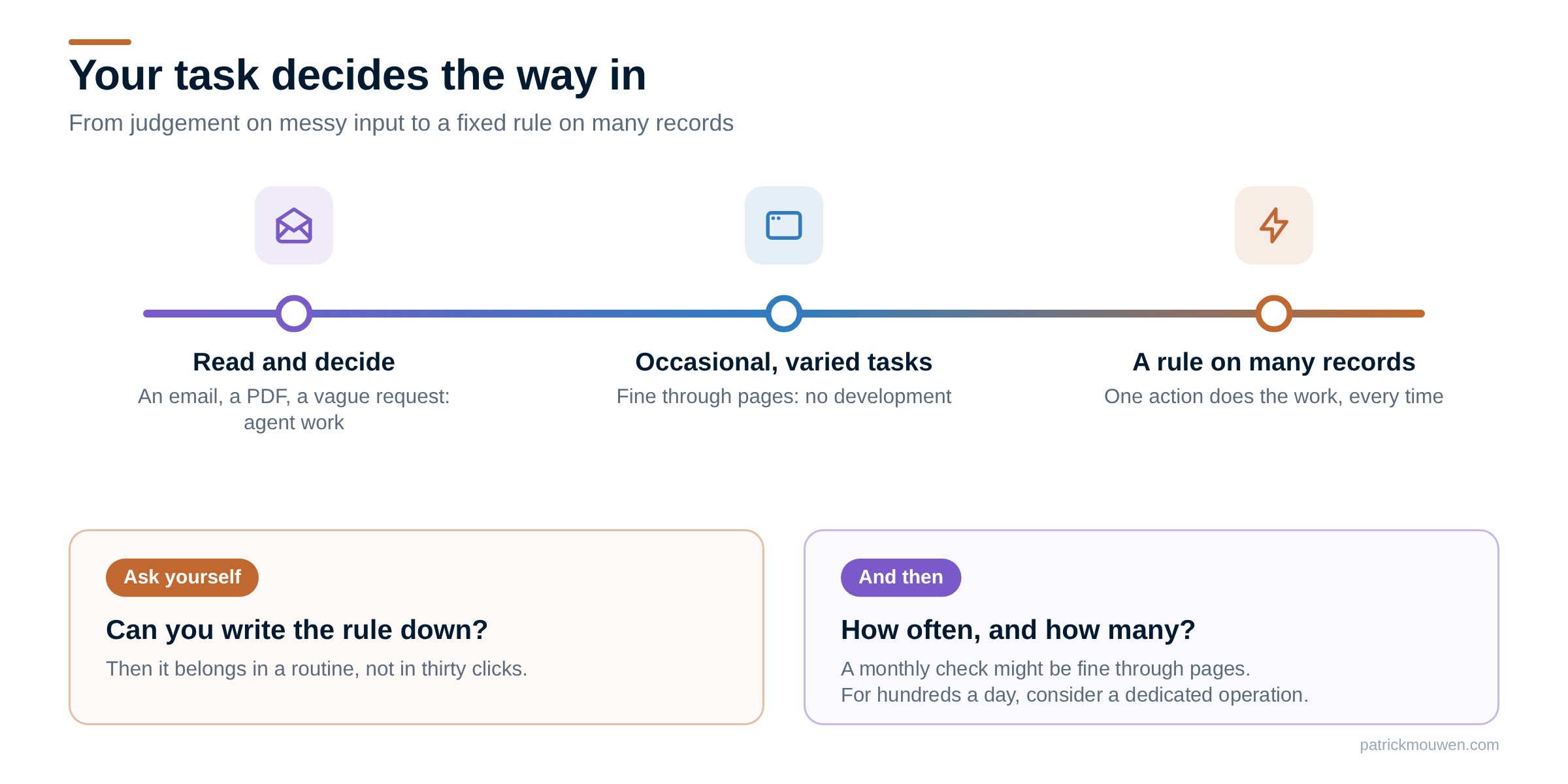
Two questions tell you where your task sits:
- Can you write the rule down? If yes, it belongs in a routine. If someone first has to read an email or a document and decide what it means, that part is agent work.
- How often, and how many? A monthly check might be fine through pages. For hundreds of records a day, a dedicated operation is usually worth considering.
Most real processes have both ends: an agent that reads and decides, and a routine that does the work.
And sometimes you need no agent at all. If a process consists entirely of fixed rules, standard D365 functionality, data entities, batch processing or an existing integration may already be the best solution.
How it works in practice
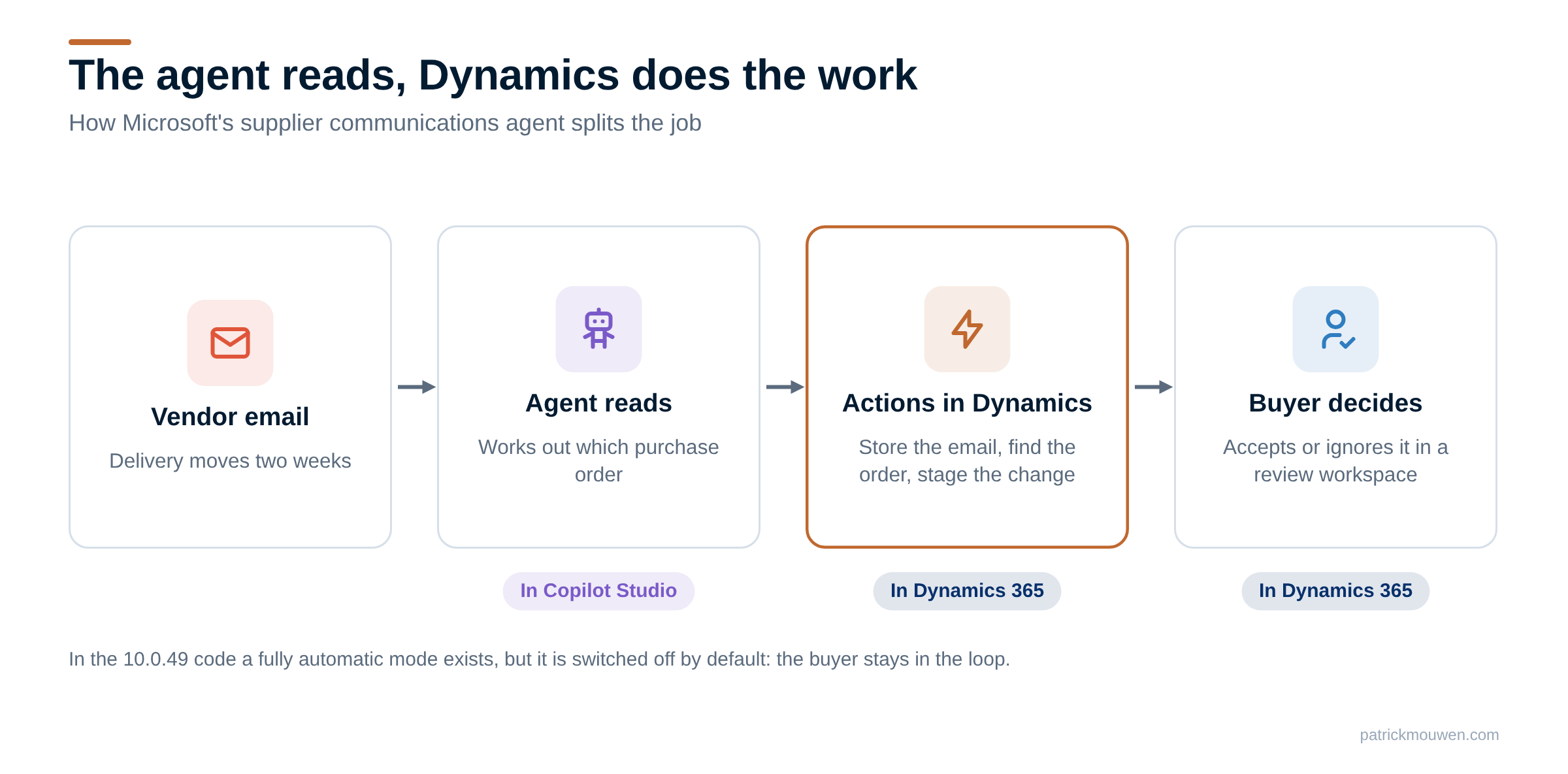
Microsoft’s own supplier communications agent shows the pattern well.
The agent reads. A vendor emails that a delivery moves two weeks. The agent, built in Copilot Studio, reads the email and works out which purchase order it is about.
Dynamics does the work. The agent then calls actions in Dynamics: store the email, find the purchase order, stage the proposed change. Those are routines in code, not clicks on a page.
The buyer decides. The proposed change waits in a review workspace in Dynamics. The buyer accepts or ignores it there. In the 10.0.49 code, a fully automatic mode exists, but it is switched off by default.
Your own process can follow the same split. Say you want to apply a new pricing rule to 200 open sales orders. Let the agent work out which orders qualify, and explain why. Let one action of your own apply the rule, with the same checks a user would get. Its X++ code decides the transaction boundaries: for 200 orders usually one per order, because one large transaction means long locks and harder error handling.
How I counted
This is my own interpretation from analysing the standard X++ code of release 10.0.49 (build 10.0.2790.83), compared with 10.0.46 for what is new. It is not Microsoft documentation, and I show no Microsoft source code: only the action names the MCP server lists, my own summaries and object names. Status follows the feature or flight that governs each action in the code, so your environment can differ. Customer and ISV actions are not included.
Public preview features can still change. Private preview features stay hidden until Microsoft switches them on, and may never ship.
The full list is in my free MCP Actions Explorer, with filters by module, status and scenario.
Have you built your own F&O actions for agents? I’d be interested to hear which scenarios you’ve tackled.
Further reading
| Source | Read | What you'll find |
|---|---|---|
| Microsoft | Use Model Context Protocol for finance and operations apps | The three tool families, security filtering and billing |
| Microsoft | Build an agent with Dynamics 365 ERP MCP | Adding the MCP server to an agent in Copilot Studio |
| Microsoft | Create AI tools with finance and operations business logic | How developers turn a routine into an action (preview) |
| Microsoft | Files with Dynamics 365 ERP MCP | How agents read and attach files |
| Community tool | MCP Actions Explorer | All 50 actions by module, status and scenario |
| Community tool | Commerce API Explorer | All Commerce Scale Unit operations, and who may call each one |